
CCaaS, built on CloudX
CloudX CCAI, the contact center that watches, scores and coaches itself
Contact center as a service on the CloudX UCaaS platform: a live floor that refreshes every 5 seconds, every call auditable from cradle to grave with the recording attached, one inbox for SMS, MMS, website chat and email, and AI that scores calls, coaches agents and supervises inside limits you set.
- From $39 per agent per month
- Only agents are seats
- Built on the CloudX platform you already run
Watch it work
Nine screens, in the order a shift actually uses them
Every screen below is the shipped product. Step through it with the tabs, the arrow keys, or previous and next.
Step 1 of 9
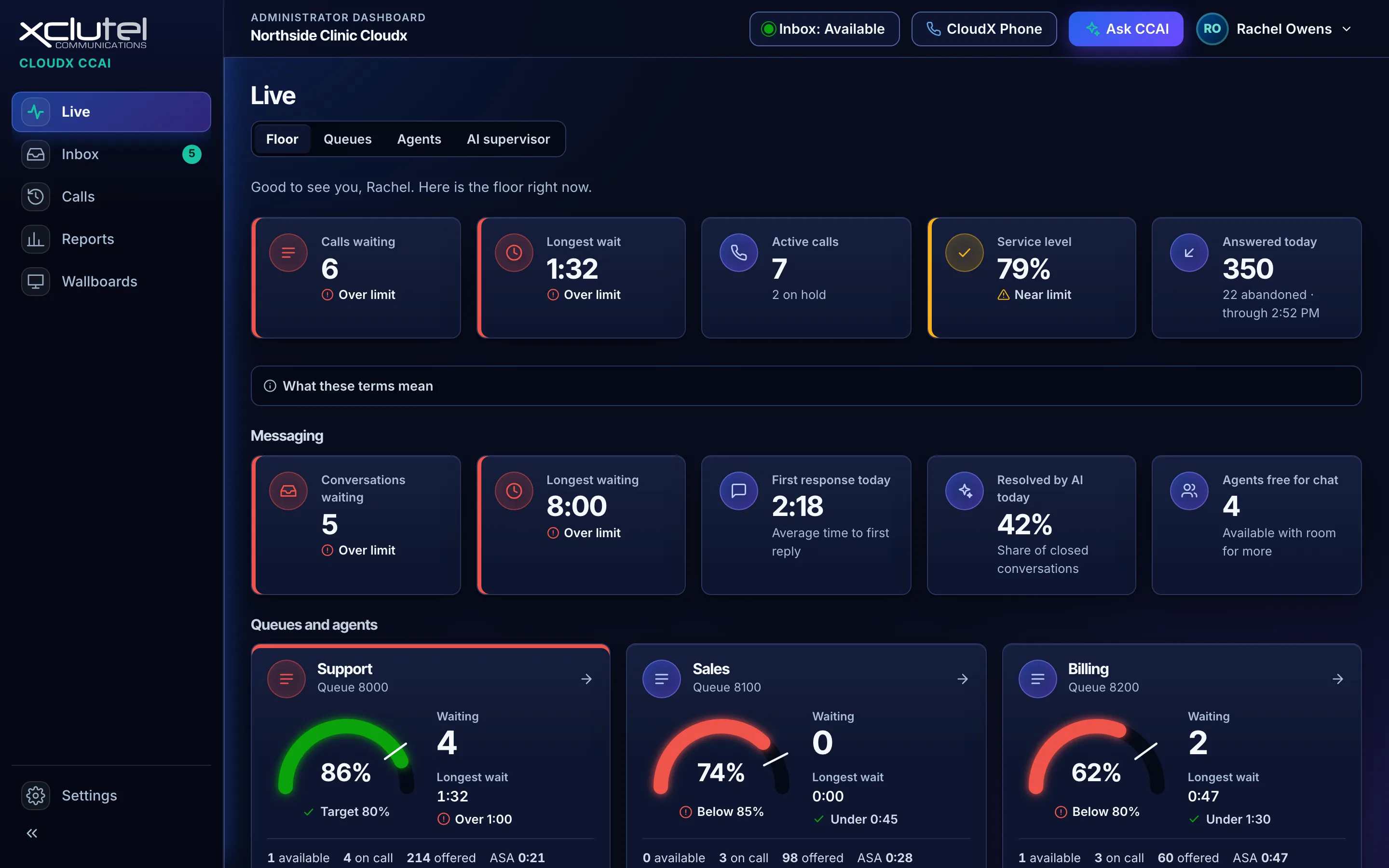
The live floor
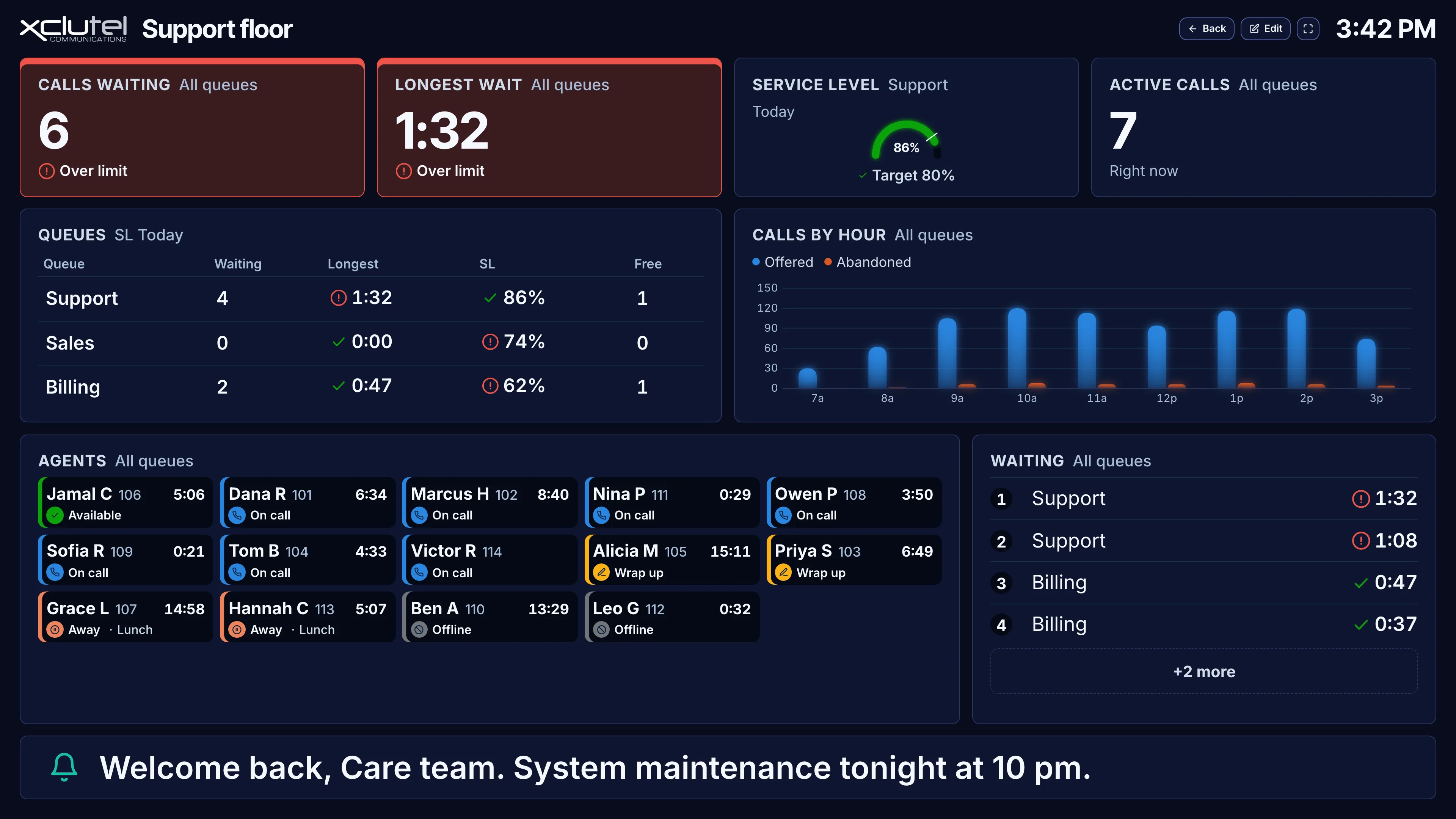
Queues down the left, agents on the right, refreshed every 5 seconds without a page reload.
- Longest wait and abandoned count, beside the queue that caused them
- Agent state and how long they have been in it
Step 2 of 9
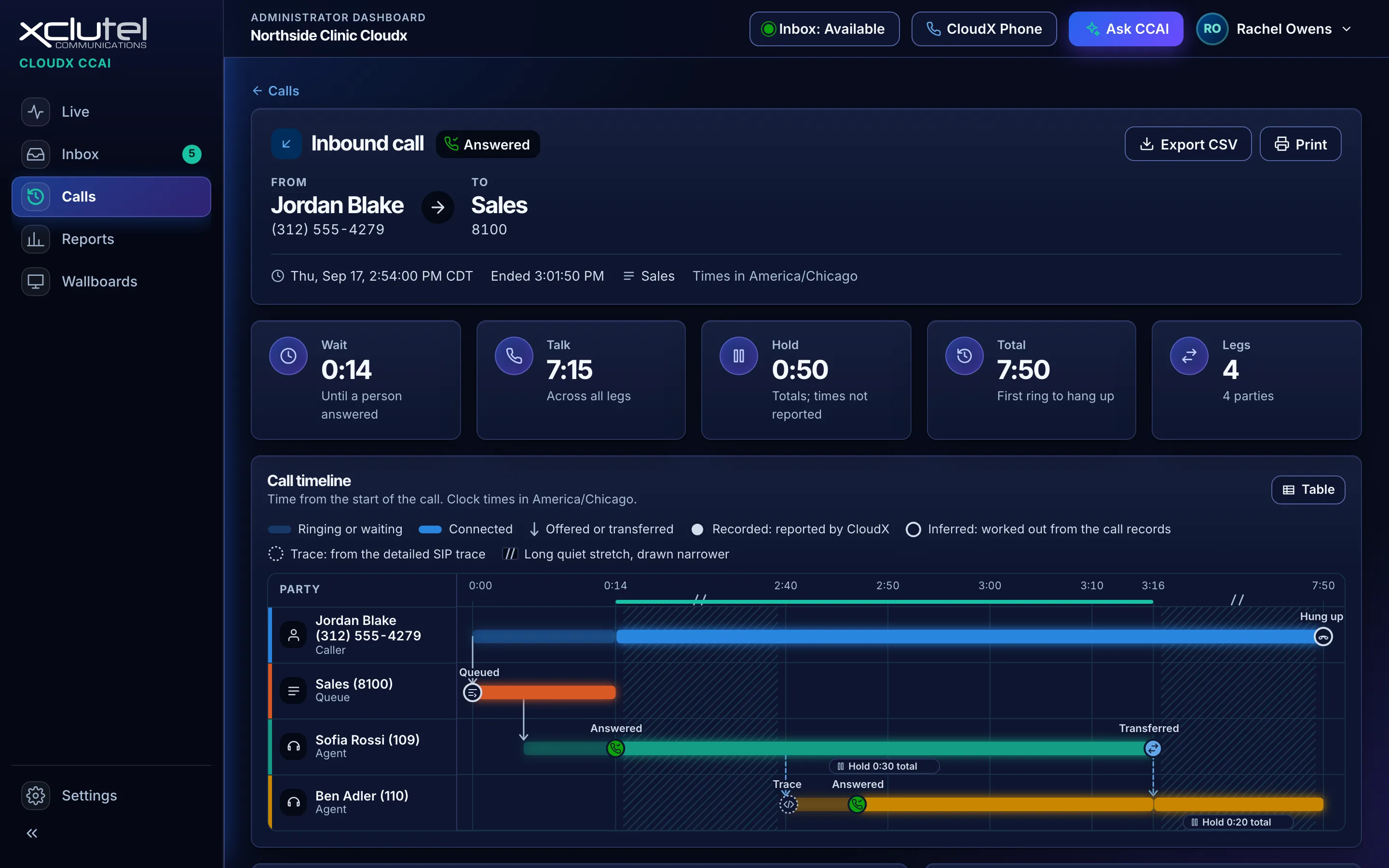
Cradle to grave
Every leg of one call in order: queue time, answer, hold, transfer and disposition.
- The whole path of the call, not just the last agent to touch it
- Export to CSV or print, straight from this view
Step 3 of 9
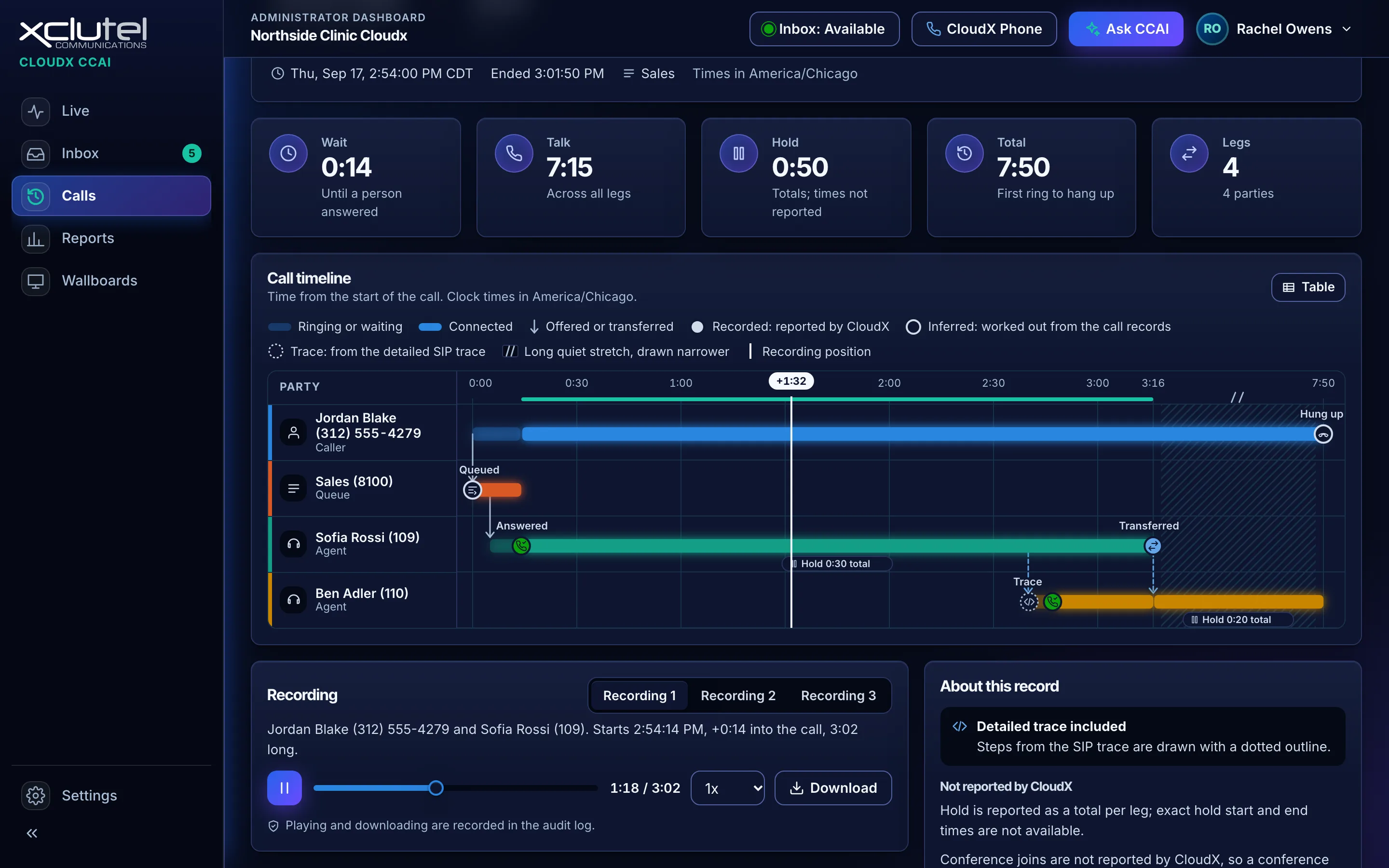
Play the call back
Press play on the call itself. The audio and the call's timeline move together, so you hear exactly what happened at each step.
- No hunting for the audio in a second system
- An audit log records who viewed or played it
Step 4 of 9
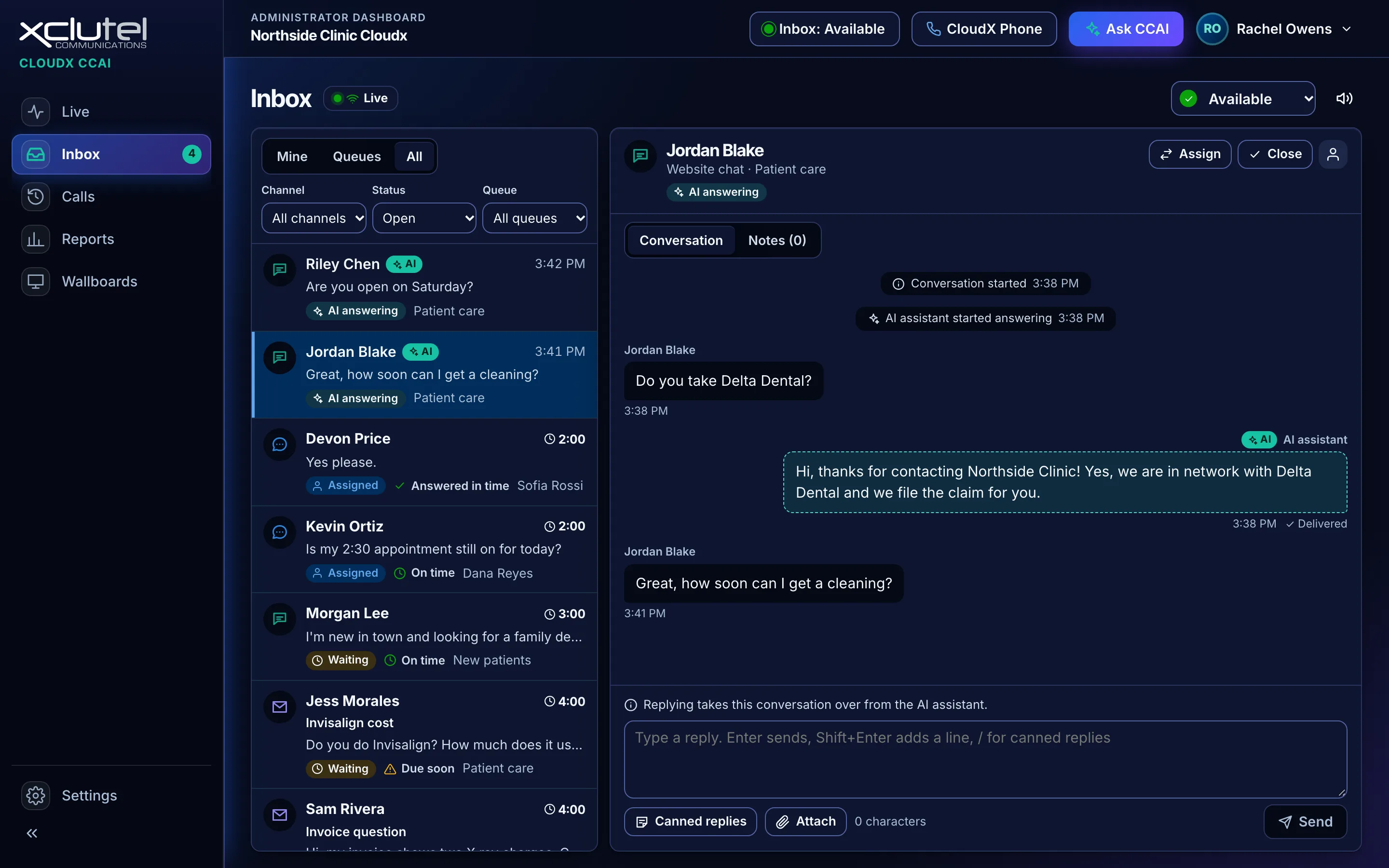
One inbox
SMS, MMS, website chat and email in one queue, routed like a call and worked like one.
- Canned replies, internal notes and attachments on the thread
- Transfer or reassign without losing the history
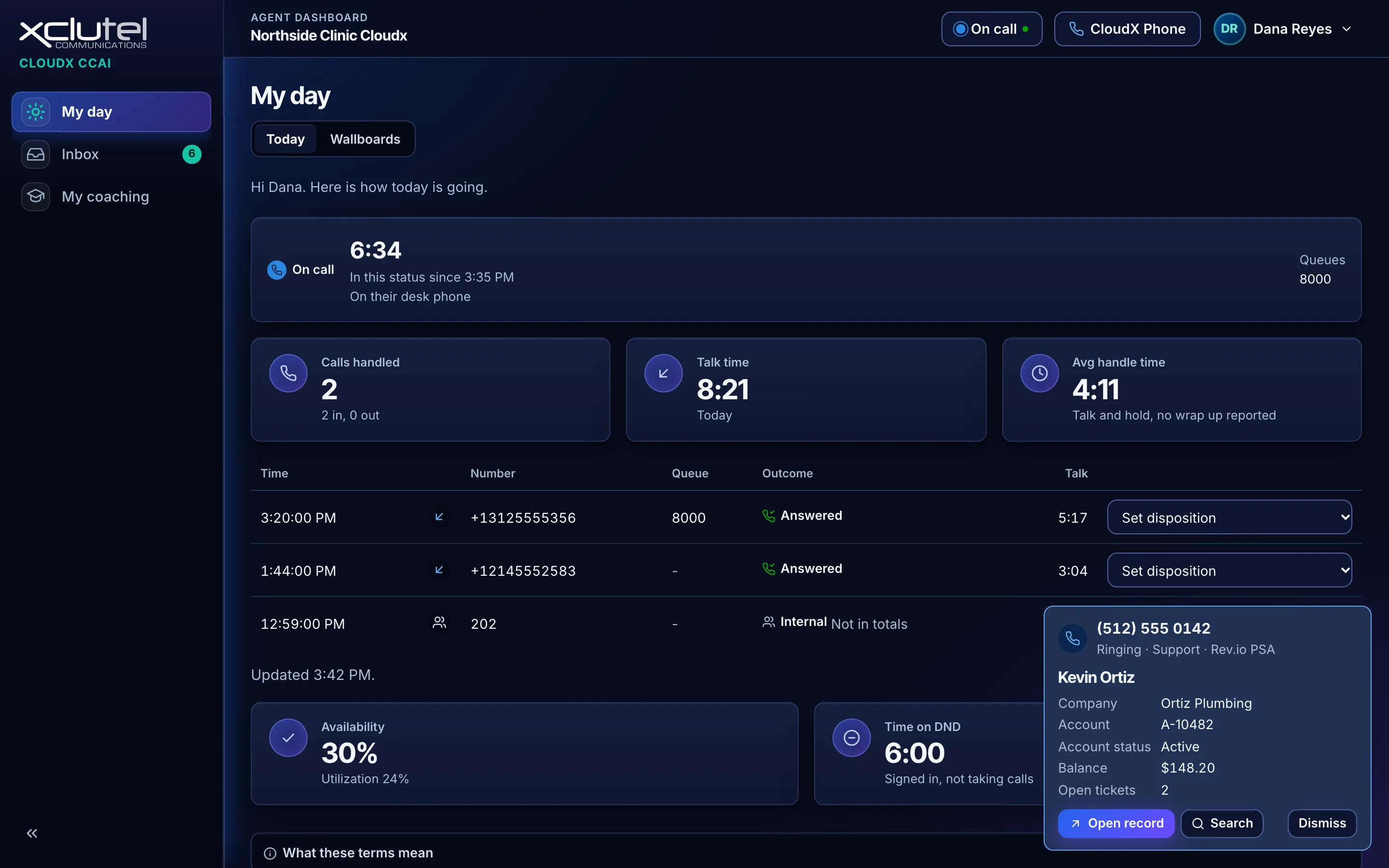
Step 5 of 9
Screen pop
The caller's record from your own CRM or PSA, open before the agent says hello.
- Read from your system at call time, not a database CCAI keeps
- Rev.io PSA, or any system behind the generic web API connector
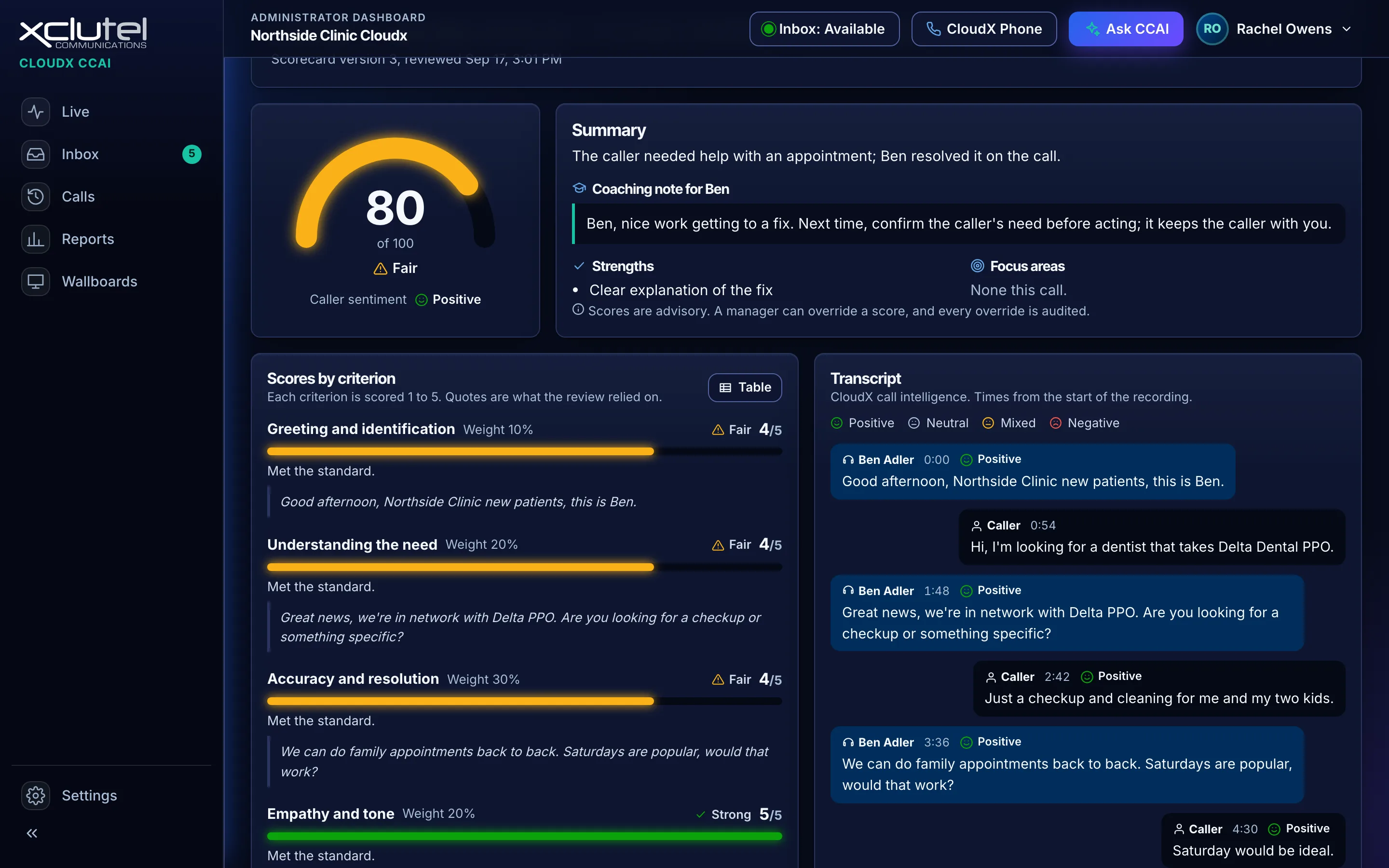
Step 6 of 9
Quality, with evidence
Each scored call cites the lines it scored on, so the score can be discussed, not just received.
- Evidence quotes under every criterion
- The criterion, the score and the reason, side by side
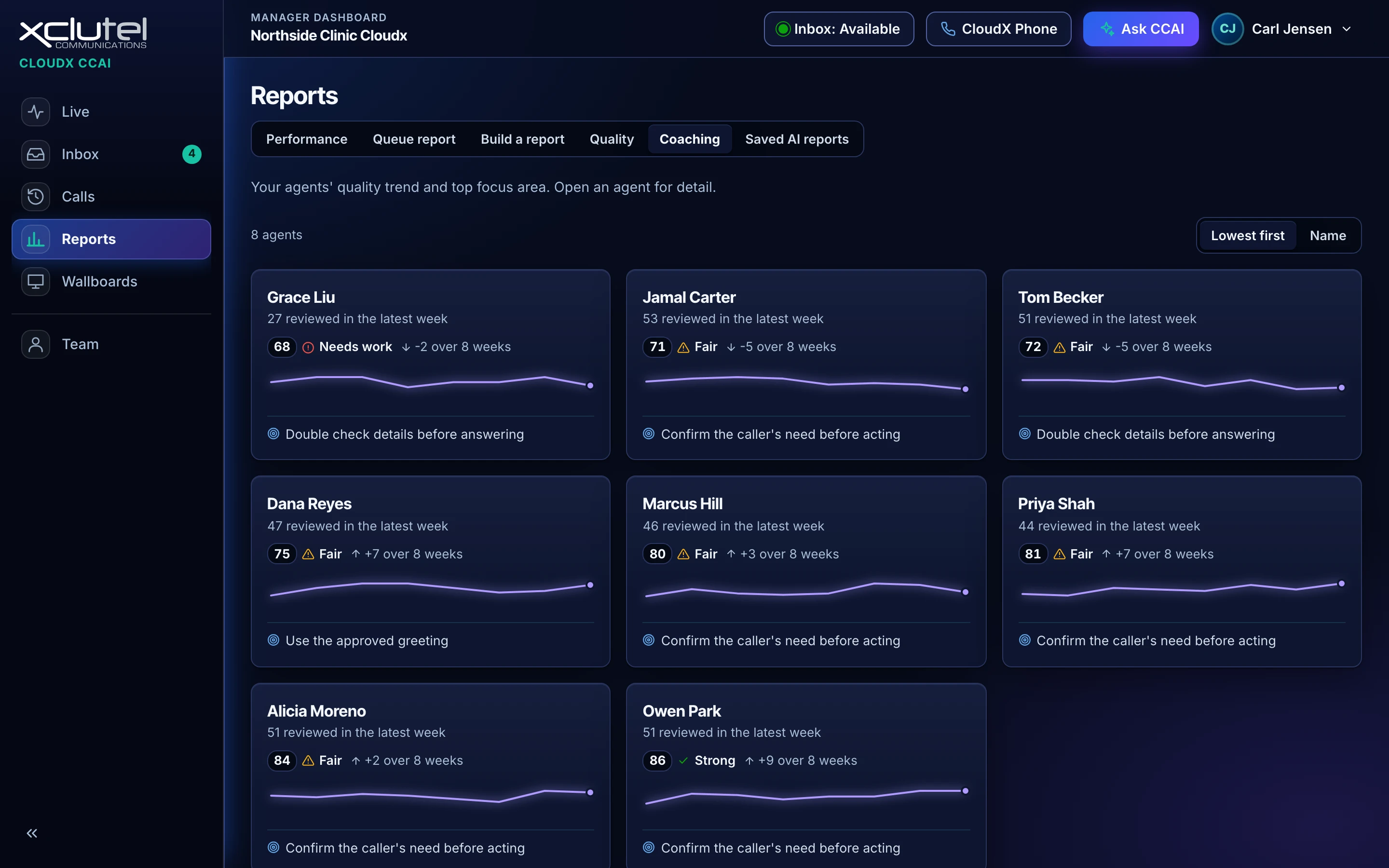
Step 7 of 9
The coaching week
One coaching summary per agent per week, assembled from that agent's own calls.
- What went well and what to work on, with the calls attached
- Built from the week's calls rather than a generic template
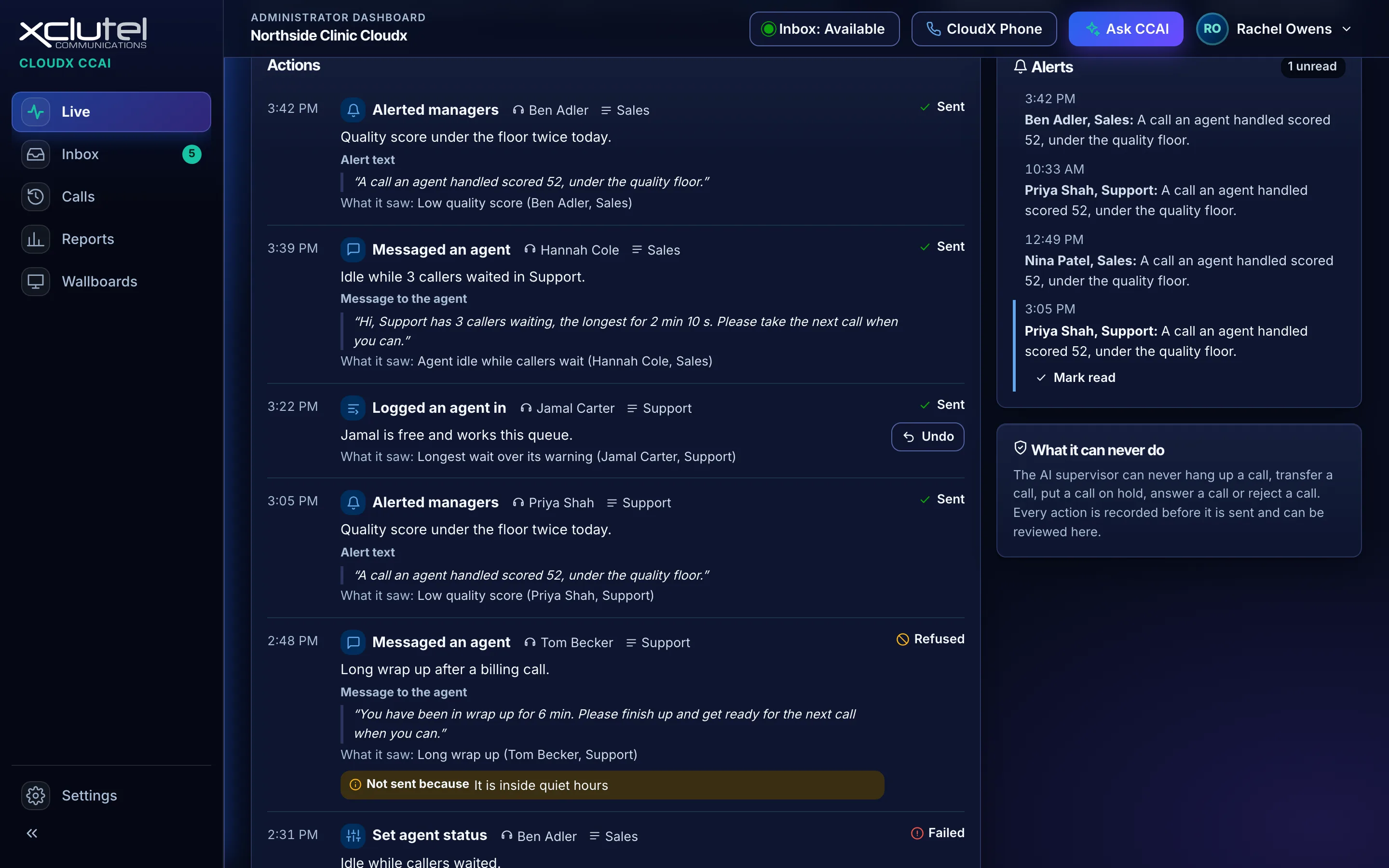
Step 8 of 9
See what the AI did, and why
The AI supervisor watches the floor and acts for you. Every action is listed with what it saw and why it acted.
- Alerts managers and messages idle agents
- Undo any action, or switch it off outright
- Never hangs up, transfers or answers a call
Step 9 of 9
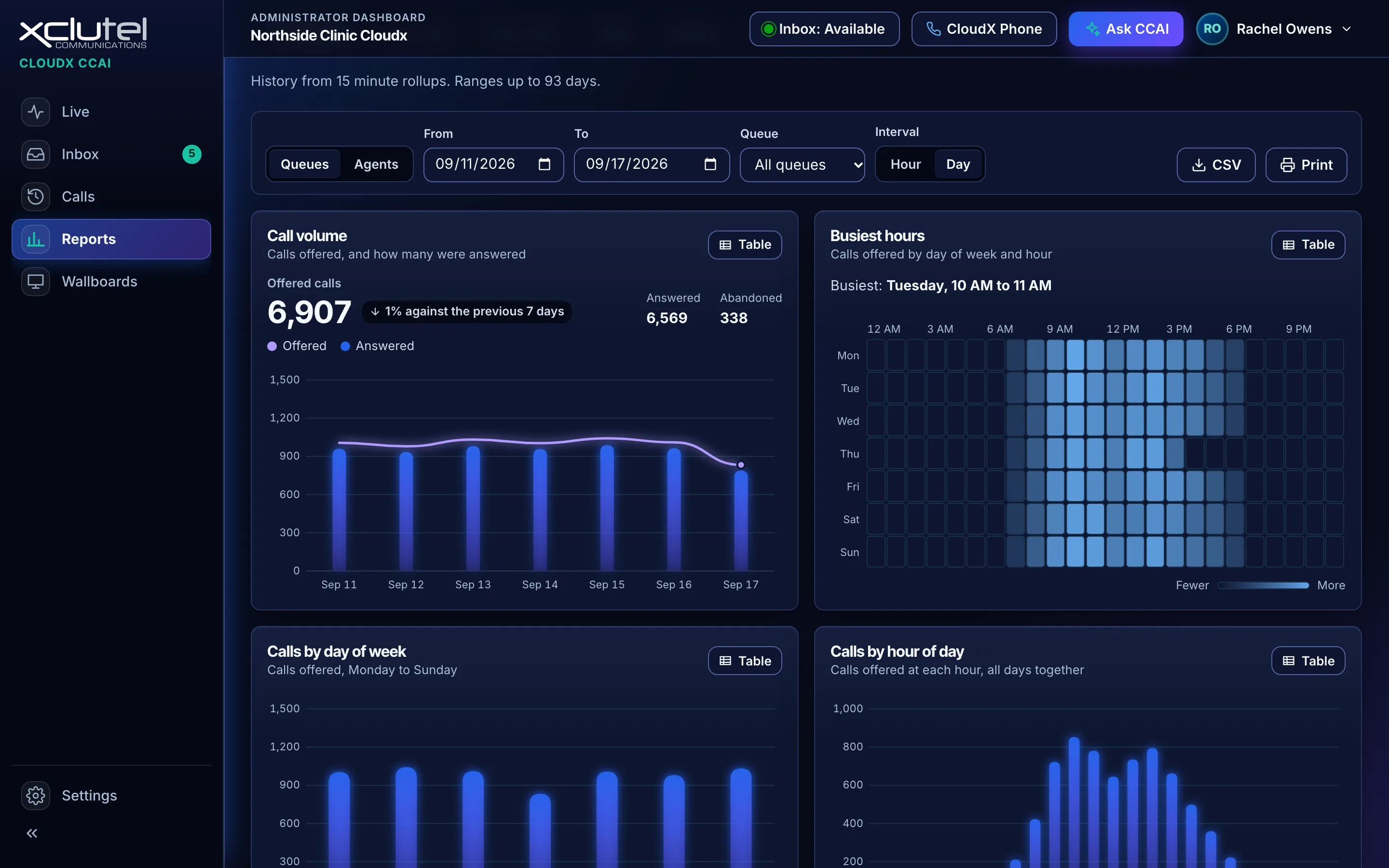
Reports you can export
Pick the dates and the queue, read the charts on screen, then download the same numbers as a CSV file.
- The export carries the filters you applied
- Scheduled delivery is available on the AI tier
Screens shown with demonstration data.
The agent's seat
Four screens for the person taking the calls
An agent signs in to the same console and sees only their own work: their day, their status, their inbox and their coaching.
Step 1 of 4
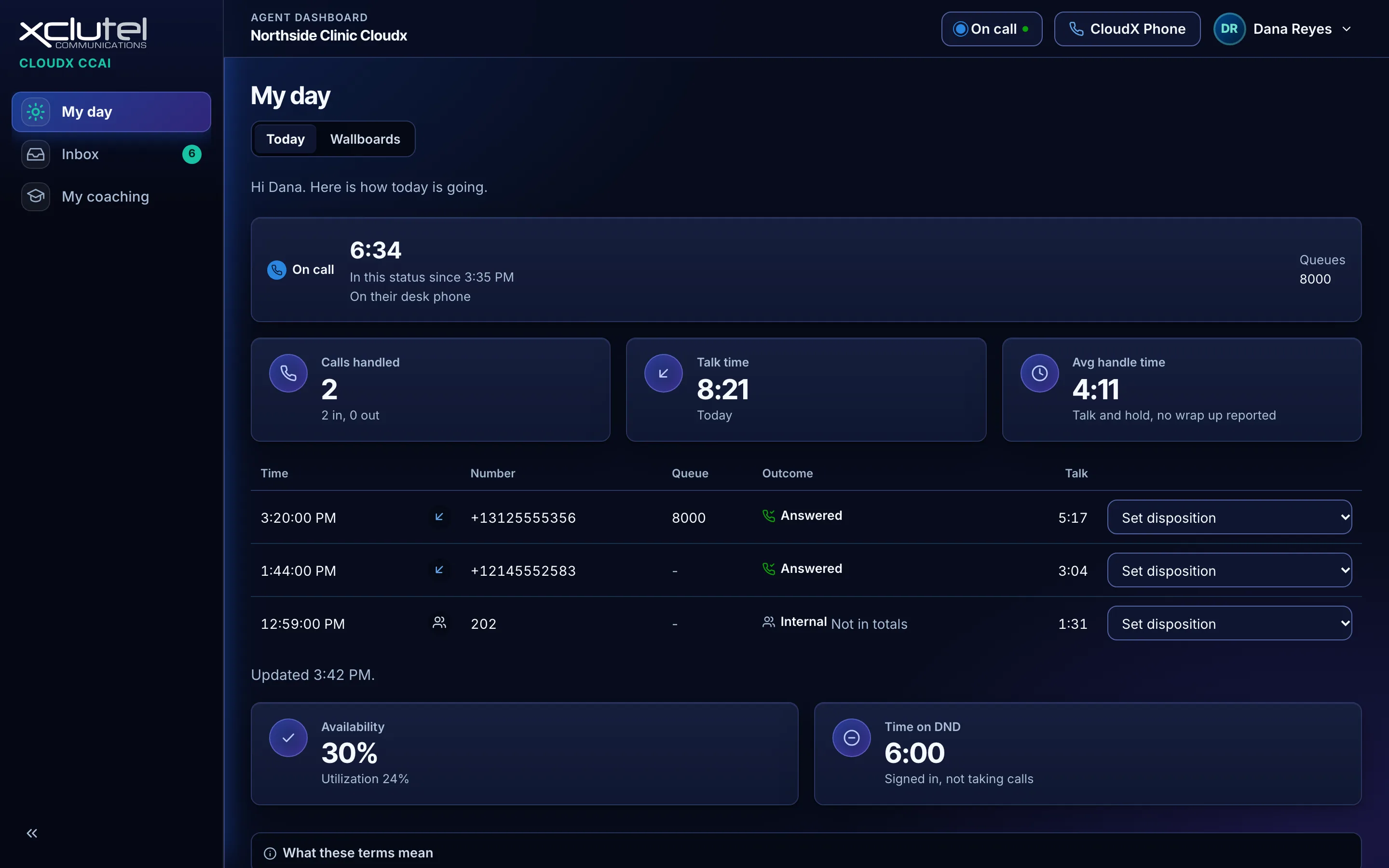
My day
The agent's home page: their own calls, talk time and availability, and nobody else's.
- Calls handled, talk time and average handle time for today
- Each call in the list takes a disposition in one click
Step 2 of 4
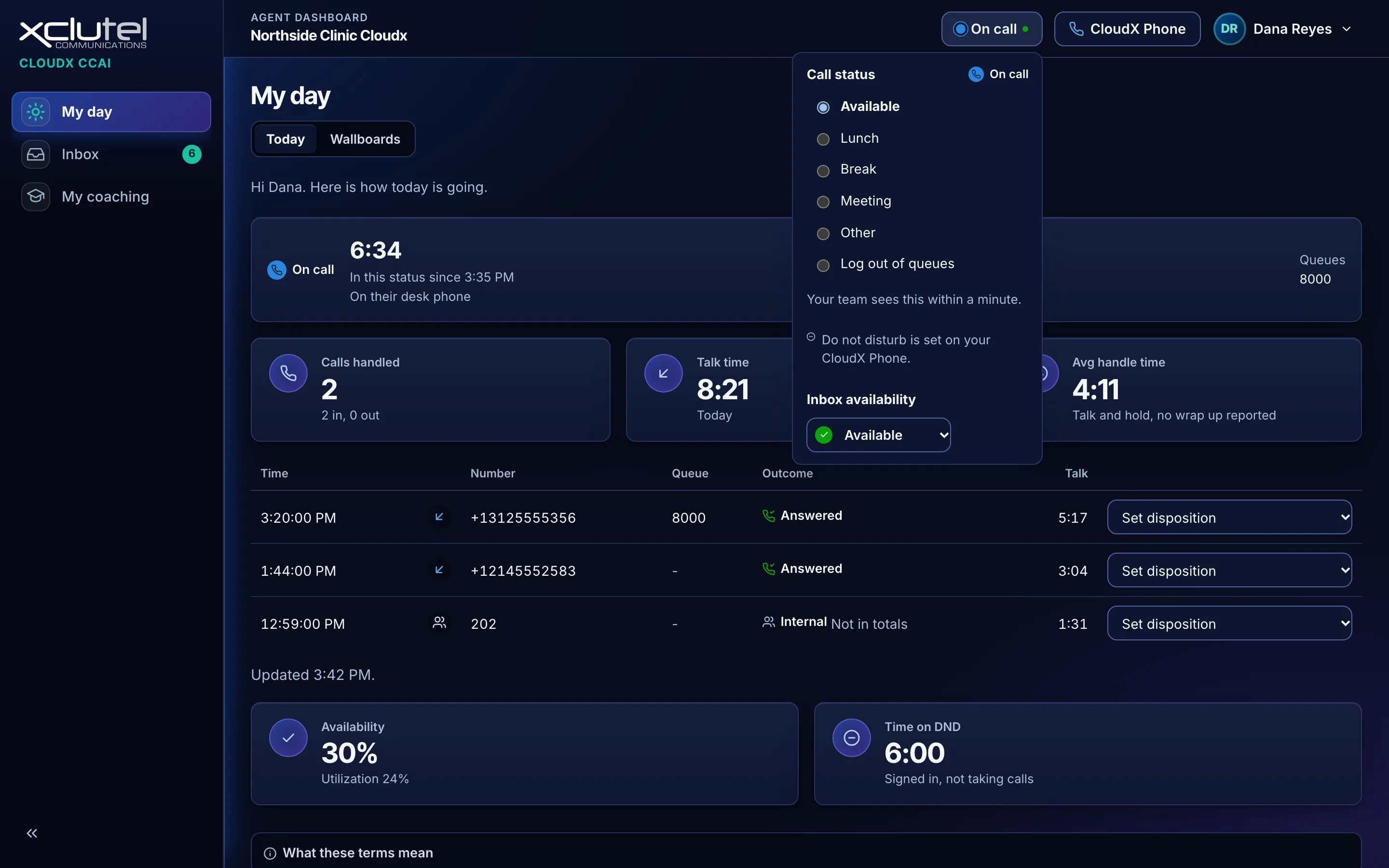
Status in one press
Lunch, a break or a meeting is one press in the top bar, and the floor sees it within a minute.
- Available, Lunch, Break, Meeting, Other and Log out of queues
- Inbox availability is set apart from call status
Step 3 of 4
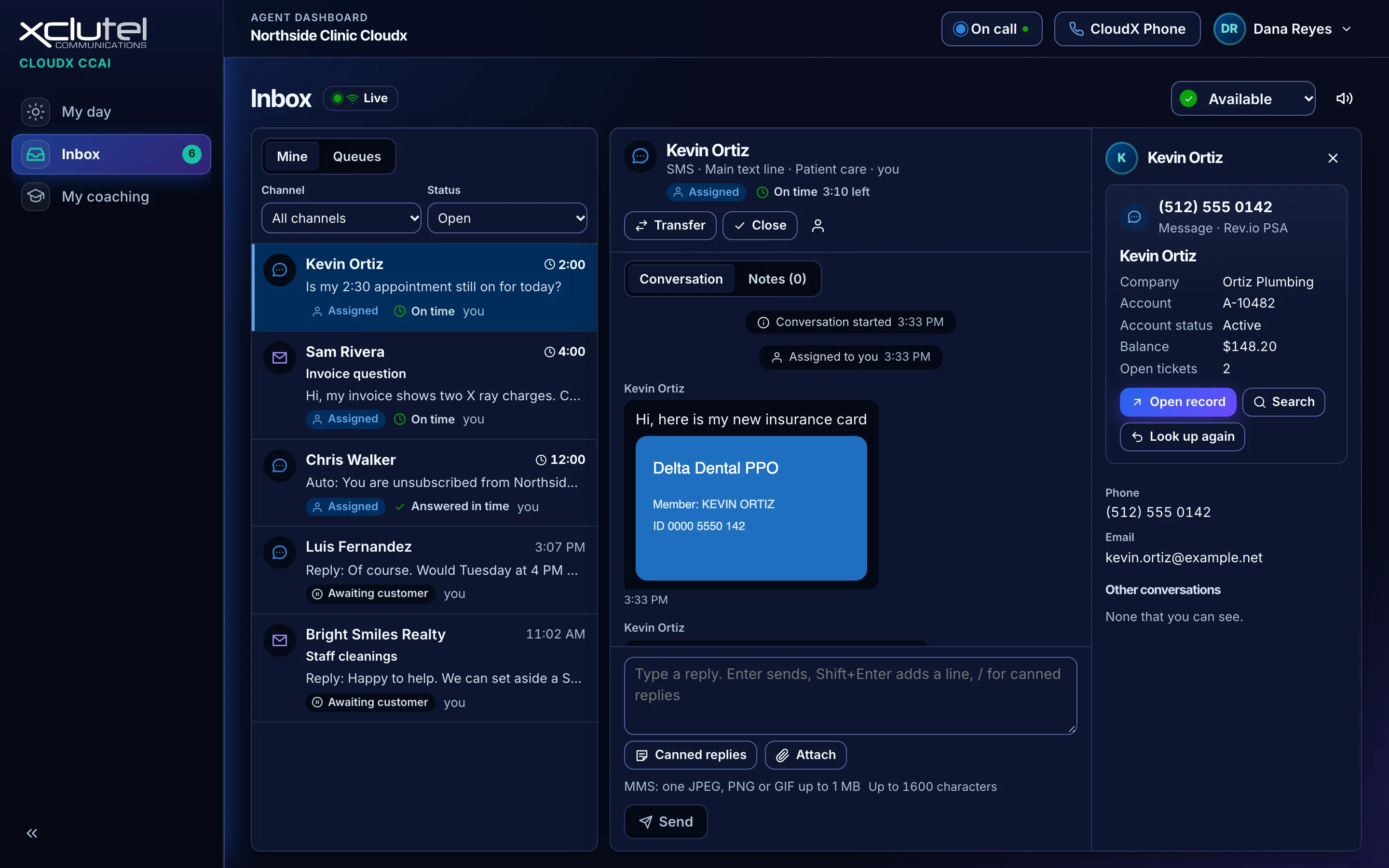
The agent's inbox
Text and email conversations assigned to the agent, with the customer's record beside the thread.
- A picture message shows in the conversation
- The record is read from your own system when the conversation opens
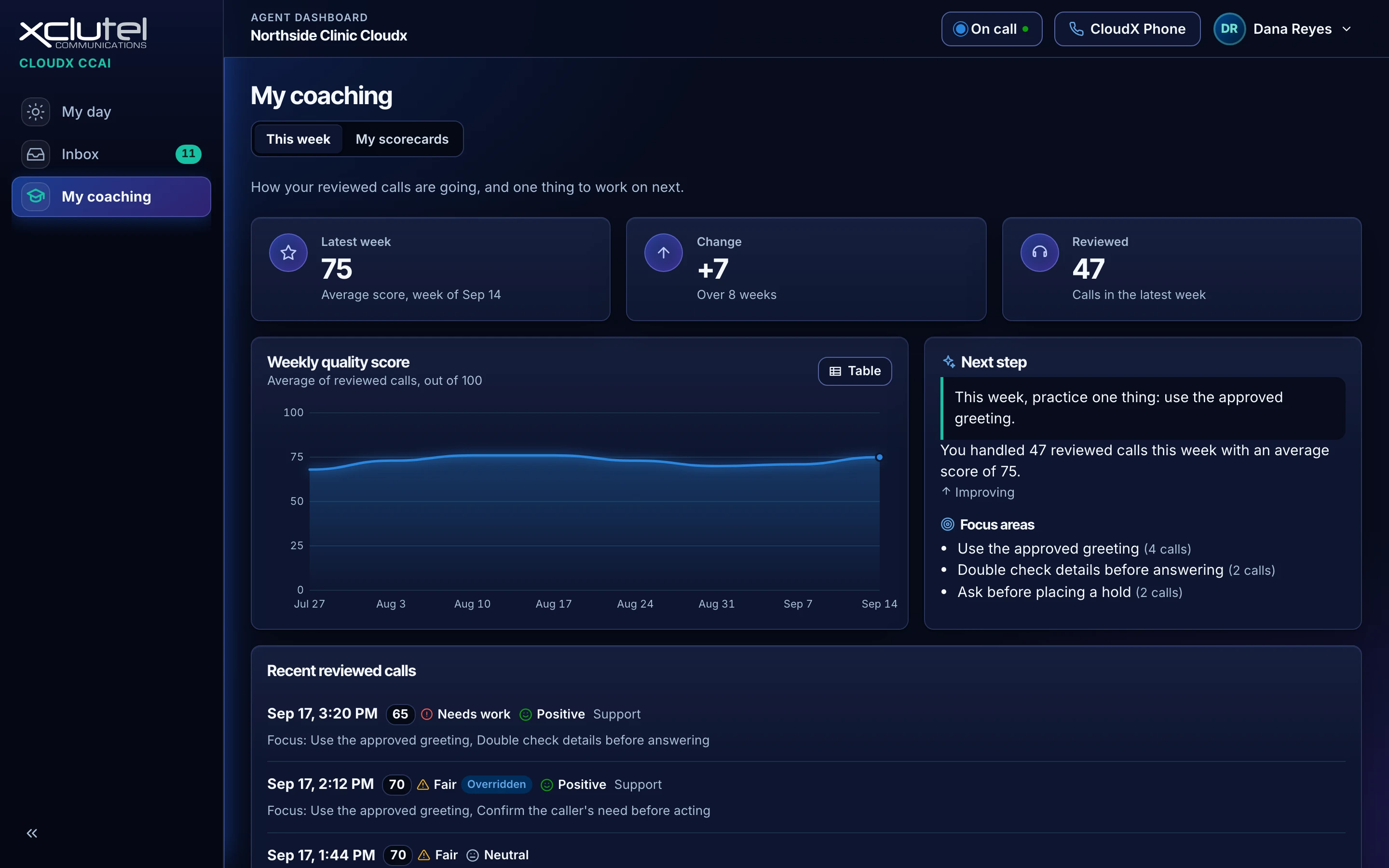
Step 4 of 4
My coaching
Each agent sees their own reviewed calls, their weekly score and one thing to work on next.
- The weekly score and how it has moved over eight weeks
- One next step, drawn from the calls that were reviewed
Screens shown with demonstration data.
What it does
Six jobs, one console
Supervisors, managers and administrators work in the same product the agents do, so nobody is reconciling two systems at the end of a shift.
Run the floor
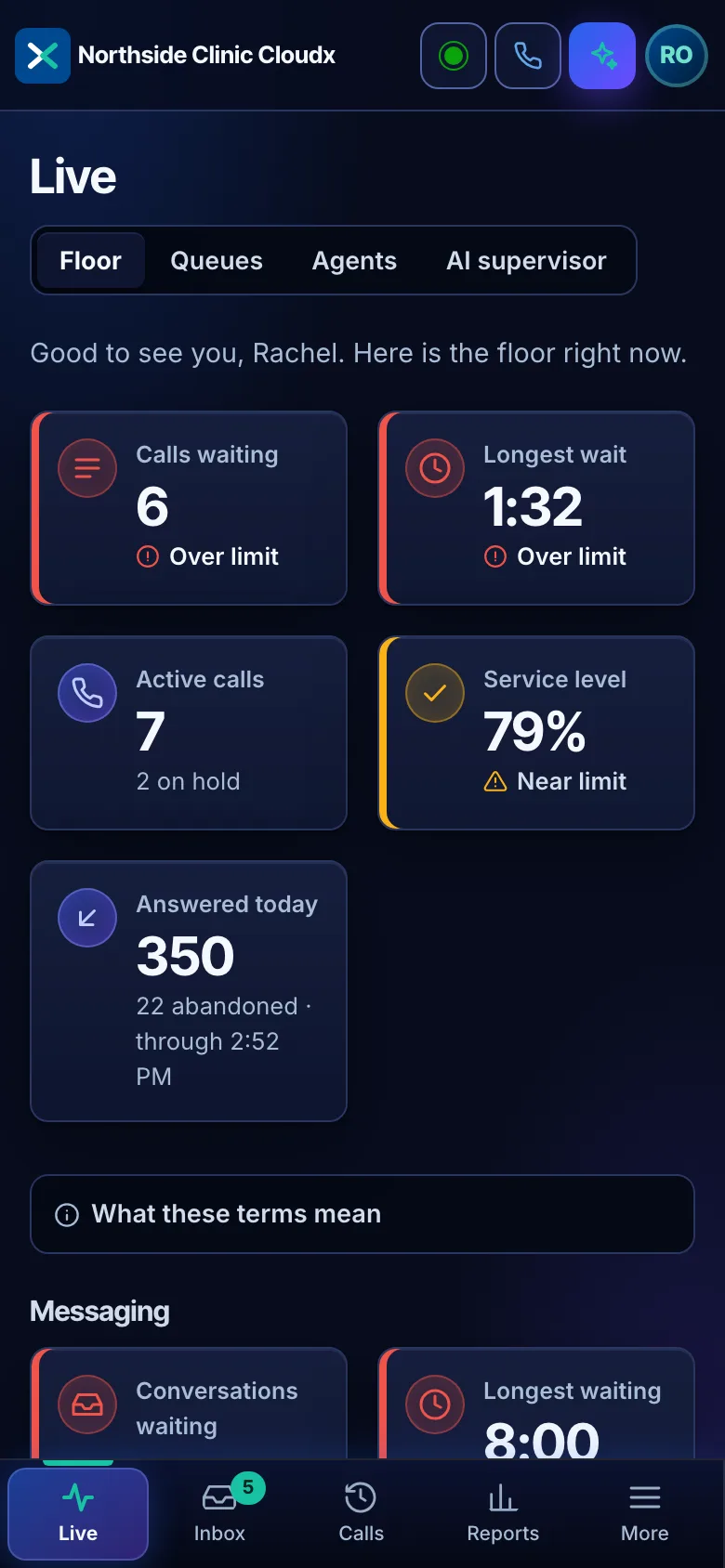
The live floor refreshes every 5 seconds and shows the queues, the agents and who is on what right now.
- Queue detail: waiting, longest wait, answered and abandoned, with a service level target and wait warning per queue
- Agent detail: state, time in state and current interaction, with Do Not Disturb shown as its own status and every other away reason beside it
- Wallboards sized for a television, with a link you can revoke or let expire
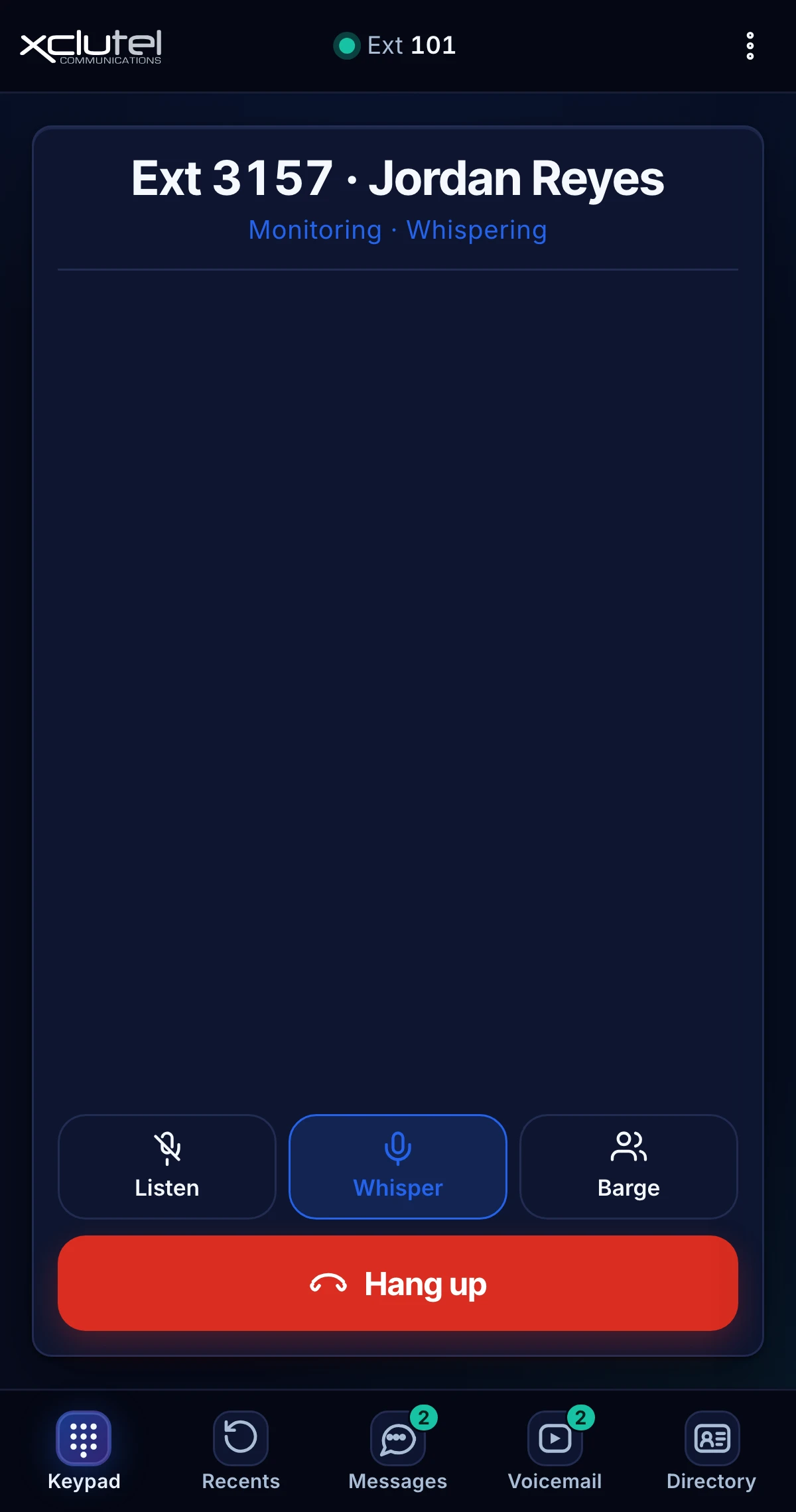
- Listen, whisper or barge on any live call from CloudX Phone, and switch between the three without leaving the call
- An admin chooses which queues the floor shows and marks lobby or warehouse extensions as not measured
- A manager sees their own teams, an admin or supervisor the whole floor
- Sign in with your existing CloudX credentials and MFA; roles for administrators, supervisors, managers and agents
Audit any call
Cradle to grave: every leg of a call in order, with the recording and a playhead on the same page.
- Transfers, holds, queue time and disposition, in sequence
- The recording plays in place, with a playhead on the timeline
- Call search from CCAI's own history, further back than the phone platform answers
- Export to CSV or print the audit for a dispute or a claim
- An audit log records who viewed, played or downloaded what, and when
- XCLUTEL support can only look inside your account through a time bounded, audited window, with every change recorded under the staff member's own name
One inbox for text
SMS, MMS, website chat and email land in one queue with the same routing rules as a call.
- Digital queues, transfers and reassignment between agents, with supervisors able to see every queue and take over a conversation
- Canned replies, internal notes, contact history across channels and file attachments both ways
- A website chat widget in your name and colors, with a thinking indicator, patience notes and a visible human takeover
- Email with a forwarding address, signature and threading; mail that fails sender checks is never answered automatically
- An AI responder that answers first from your knowledge base and hands off to a person the moment the answer is not in there
Score and coach
AI call quality scoring reads the call and cites the line it scored, so a score can be argued with.
- Evidence quotes pulled from the call, not a bare number, plus sentiment, a summary and a coaching note
- Weekly coaching for each agent, built from that week's calls; managers see their teams
- Scores by criterion, so a coaching conversation starts from the call
- A sampling rate you set, a monthly AI budget with alerts and a pause
- Trends by team, queue and agent over time
Ask CCAI
Admins, supervisors and managers ask a question in plain English and get an answer from their own data.
- Answers come from that account's data and nowhere else
- Scoped to what the asker is already allowed to see
- Follow up questions keep the context of the last answer
- Scheduled reports assembled by AI and emailed on a timetable
- An AI supervisor that watches the floor every minute, coaches agents from fixed templates and alerts managers, with every action recorded first, undo for an hour, daily caps, quiet hours and a kill switch
Report and export
Filtered reports with CSV export, so the numbers can leave the product and go into a board pack.
- Filter by date, queue, team, agent and disposition
- Time in status, availability, utilization and away time by reason
- CSV export on every report, with the filters applied
- History kept by CCAI in quarter hour detail, so a month of reporting never touches the phone platform
- Scheduled delivery on the AI tier
From the floor into the call
Listen, whisper, barge
A supervisor picks an agent on the live floor and joins the call from CloudX Phone, the XCLUTEL browser based phone. Listen hears both sides and neither knows. Whisper coaches the agent in their ear while the caller hears nothing. Barge joins the conversation outright. Switching between the three is one tap, and the call never drops.
Included in every CCAI tier, Core up. CloudX Phone comes with every CloudX Standard and Premium seat.See CloudX Phone
The AI supervisor
What it does, and what it can never do
An autonomous supervisor is only worth having if the list of things it cannot reach is short, specific and enforced. Here is ours.
What it does
- Acts only inside limits the account sets, per action and per queue
- Records every action before it is sent, with the reason it chose it
- Every action can be undone, one at a time, from the action feed
- Has a kill switch that stops it immediately, for any role that can see it
- Messages agents and supervisors, and flags queues that are slipping
- Keeps each customer's data inside that customer's own account
What it never does
- Never hangs up a call
- Never transfers a call
- Never places a call on hold
- Never answers a call
- Never rejects a call
- Never touches the audio of a call in progress
The kill switch is on the same screen as the action log, not buried in a settings page, and every supervisor is shown it on their first day.
Agent Console and CCAI
Stop routing by menu. Route by meaning.
Agent Console answers every call, chat and text, works out why the person reached out, and sends them to the right team. CloudX CCAI runs that team. No phone tree, no skills matrix, from $199 a month.
The caller says
“Hi, the invoice we got this month looks wrong.”
Agent Console hears
A billing question
It sends them to
Your billing queue, live
Skills based routing
- Press 1 for billing, 2 for support, and hope they pick right
- A skills matrix someone has to keep up to date
- A menu rebuilt every time your team changes
- Mostly sold to contact centers
Intelligent routing with Agent Console
- Callers just say what they need
- Routing by what they said, not which key they pressed
- Change where a reason goes in the console, in minutes
- Included from the $199 Receptionist plan, for any business
The AI front desk, and the contact center behind it
Agent Console answers
Every call, website chat and text on your CloudX numbers, day or night. It solves the common questions itself.
It routes by meaning
It transfers live to the right CloudX queue or person. If nobody picks up, the caller comes back to the agent and leaves a message in your Inbox. Never dead air.
CCAI runs the team
Live queues and agents, reporting, coaching, and one queue for SMS, website chat and email. On the AI tier, every call is reviewed with no meter.
- CCAI sits outside the call path. No extensions used, nothing to install.
- Your team signs in to CCAI with the CloudX login it already has.
- XCLUTEL sets up both and supports both, on one account.
In development, no date announced
- The reason on the agent's screen before hello
- Reports of contacts by reason
- One record of the AI conversation and the handoff
Channels
Four channels today, in one queue
A digital conversation is routed, transferred, reported and audited the same way a call is, because it is the same queue.
Voice
Inbound and outbound on the CloudX platform, with queues, recording and the full call audit.
SMS and MMS
Text and picture messaging on your own numbers, routed into the same queues as a call.
Website chat
One script tag on your site. The widget wears your name, colors and photo, shows the visitor who is working on their question, and hands to an agent in the same conversation.
Email into a digital queue, with canned replies, notes, attachments and transfers.
Free 10DLC website scan
Texting customers? See if your website passes carrier review.
SMS in the CCAI inbox runs on your own numbers, which means 10DLC registration, and carriers open your website before they approve it. Scan it now so the registration goes through the first time. XCLUTEL files it and watches every stage of approval.
Free. No account. Nothing on your site is changed.
Integrations
The caller's record, open before hello
When a call, chat or email comes in, the caller's account and open tickets are on screen before the agent says hello. XCLUTEL connects your system and tests it against real records.
- Salesforce
- HubSpot
- Microsoft Dynamics 365
- Rev.io PSA
- Zendesk
- Zoho CRM
- Pipedrive
- ConnectWise PSA
- Datto Autotask PSAComing soon


Autotask is coming soon. More connections are added on request.
Pricing
Three tiers, priced per agent per month
Only agents are seats. Supervisors, managers and administrators use the console at no charge, so the agent count is the whole of the software bill.
Core
$39per agent, per month
The floor, the history and the reporting. Everything a supervisor needs to run a shift.
- Live floor, refreshed every 5 seconds
- Wallboards with revocable TV links
- Listen, whisper and barge from CloudX Phone
- Cradle to grave call audit with the recording
- Reports with filters and CSV export
Most popular
Plus
$59per agent, per month
Adds the digital channels, the web chat widget and the screen pop, so one queue covers voice and text.
- One inbox for SMS, MMS, website chat and email
- Digital queues, canned replies, notes and transfers
- Website chat widget in your name and colors
- Screen pops from your own CRM or PSA
AI
$89per agent, per month
Adds quality scoring, coaching, the AI responder, Ask CCAI and the AI supervisor, inside limits you set.
- AI responder for texts and web chat, answering from your knowledge base
- AI call quality scoring with evidence quotes
- Weekly coaching built from the week's own calls
- Ask CCAI for admins, supervisors and managers
- Every call reviewed, or a sample you set, at no extra charge
AI is included, not metered
The AI tier reviews your calls at no charge per call, per minute or per summary. There is no allowance to watch and no overage line on the invoice.
No seat minimum
A six agent floor buys the same product a sixty agent floor does. Nothing here is priced to keep smaller contact centers out.
Nothing is an add on
Everything listed in your tier is in the price. Quality, reporting, the call audit, the integrations and, on the AI tier, the AI itself. No separate line, no module to buy later.
Compare every feature
| Feature | Core | Plus | AI |
|---|---|---|---|
| Live floor with queue and agent detail, refreshed every 5 seconds | |||
| Wallboards with revocable TV links | |||
| Listen, whisper and barge on any live call from CloudX Phone | |||
| Cradle to grave call audit, every leg of the call in order | |||
| Recording player with a playhead, on the call record itself | |||
| Export a call audit to CSV, or print it | |||
| Audit log of who viewed or played a recording, and when | |||
| Reports with filters on date, queue, team and agent, and CSV export | |||
| Service level target and wait warning per queue | |||
| Call search from CCAI's own history, beyond what the phone platform answers | |||
| Time in status, availability and away time by reason | |||
| Sign in with CloudX credentials and MFA; readiness check before go live | |||
| Roles for admins, supervisors, managers and agents | |||
| One inbox for SMS, MMS, website chat and email | Not included in Core | ||
| Digital queues with routing, transfers and reassignment | Not included in Core | ||
| Canned replies, internal notes, contact history and file attachments | Not included in Core | ||
| Website chat widget in your name and colors, with visible human takeover | Not included in Core | ||
| Knowledge base kept in step with your own system, refreshed automatically | Not included in Core | ||
| Screen pops from your own CRM or PSA on an inbound call | Not included in Core | ||
| Rev.io PSA connector and a generic web API connector | Not included in Core | ||
| AI responder that answers texts and web chat from your knowledge base, then hands off | Not included in Core | Not included in Plus | |
| AI call quality scoring with evidence quotes from the call | Not included in Core | Not included in Plus | |
| Weekly coaching for each agent, built from that week's calls | Not included in Core | Not included in Plus | |
| Ask CCAI, answering from your own data and scoped to the asker | Not included in Core | Not included in Plus | |
| Scheduled reports assembled by AI and delivered on a timetable | Not included in Core | Not included in Plus | |
| AI supervisor acting inside limits you set, with undo and a kill switch | Not included in Core | Not included in Plus | |
| AI call review of every call, or a sample rate you set | Not included in Core | Not included in Plus | |
| Monthly AI budget per account, with alerts and a pause | Not included in Core | Not included in Plus |
Core: what this tier includes
- Live floor with queue and agent detail, refreshed every 5 seconds
- Wallboards with revocable TV links
- Listen, whisper and barge on any live call from CloudX Phone
- Cradle to grave call audit, every leg of the call in order
- Recording player with a playhead, on the call record itself
- Export a call audit to CSV, or print it
- Audit log of who viewed or played a recording, and when
- Reports with filters on date, queue, team and agent, and CSV export
- Service level target and wait warning per queue
- Call search from CCAI's own history, beyond what the phone platform answers
- Time in status, availability and away time by reason
- Sign in with CloudX credentials and MFA; readiness check before go live
- Roles for admins, supervisors, managers and agents
Plus: what this tier includes
- Live floor with queue and agent detail, refreshed every 5 seconds
- Wallboards with revocable TV links
- Listen, whisper and barge on any live call from CloudX Phone
- Cradle to grave call audit, every leg of the call in order
- Recording player with a playhead, on the call record itself
- Export a call audit to CSV, or print it
- Audit log of who viewed or played a recording, and when
- Reports with filters on date, queue, team and agent, and CSV export
- Service level target and wait warning per queue
- Call search from CCAI's own history, beyond what the phone platform answers
- Time in status, availability and away time by reason
- Sign in with CloudX credentials and MFA; readiness check before go live
- Roles for admins, supervisors, managers and agents
- One inbox for SMS, MMS, website chat and email
- Digital queues with routing, transfers and reassignment
- Canned replies, internal notes, contact history and file attachments
- Website chat widget in your name and colors, with visible human takeover
- Knowledge base kept in step with your own system, refreshed automatically
- Screen pops from your own CRM or PSA on an inbound call
- Rev.io PSA connector and a generic web API connector
AI: what this tier includes
- Live floor with queue and agent detail, refreshed every 5 seconds
- Wallboards with revocable TV links
- Listen, whisper and barge on any live call from CloudX Phone
- Cradle to grave call audit, every leg of the call in order
- Recording player with a playhead, on the call record itself
- Export a call audit to CSV, or print it
- Audit log of who viewed or played a recording, and when
- Reports with filters on date, queue, team and agent, and CSV export
- Service level target and wait warning per queue
- Call search from CCAI's own history, beyond what the phone platform answers
- Time in status, availability and away time by reason
- Sign in with CloudX credentials and MFA; readiness check before go live
- Roles for admins, supervisors, managers and agents
- One inbox for SMS, MMS, website chat and email
- Digital queues with routing, transfers and reassignment
- Canned replies, internal notes, contact history and file attachments
- Website chat widget in your name and colors, with visible human takeover
- Knowledge base kept in step with your own system, refreshed automatically
- Screen pops from your own CRM or PSA on an inbound call
- Rev.io PSA connector and a generic web API connector
- AI responder that answers texts and web chat from your knowledge base, then hands off
- AI call quality scoring with evidence quotes from the call
- Weekly coaching for each agent, built from that week's calls
- Ask CCAI, answering from your own data and scoped to the asker
- Scheduled reports assembled by AI and delivered on a timetable
- AI supervisor acting inside limits you set, with undo and a kill switch
- AI call review of every call, or a sample rate you set
- Monthly AI budget per account, with alerts and a pause
What else is on the bill
CloudX recording and AI insights
Requiredon your CloudX seats
CCAI needs CloudX to record your calls. Premium seats already do, so there is nothing to add. On Basic or Standard seats, add call recording for CCAI Core or Plus, or AI insights for the CCAI AI tier. You only ever need one. Both are priced on the CloudX page and billed with your CloudX service.
AI call review
Includedwith the AI tier
No per minute charge and no allowance to watch. CCAI reviews every call by default, and an administrator can set a sample rate instead if a lighter read is enough.
Ask CCAI and AI built scheduled reports
Includedwith the AI tier
Included within fair use. XCLUTEL contacts the account before anything is throttled or billed, never after.
SMS and MMS
Includedwith the Plus and AI tiers
Texting runs on CloudX, so XCLUTEL adds no per message charge. If a carrier passes a charge through, XCLUTEL passes it on at cost with nothing added.
Transcripts and recordings
90 daysof transcripts, included
CCAI keeps the text of a call for 90 days. Scores, evidence quotes, summaries and coaching notes are kept so the trends survive, and the recordings themselves stay in CloudX under your own CloudX retention.
Roles and seats
Four roles. One of them is a seat.
Administrator
No seat
Sets up queues, roles, limits, integrations and retention. Sees the whole account and can use Ask CCAI.
Manager
No seat
Reads reports, quality scores and coaching across teams. Uses Ask CCAI within what the role already allows.
Supervisor
No seat
Runs the live floor across the whole account, reviews call audits and recordings, and holds the kill switch.
Agent
One seat
Takes calls and digital interactions, sees their own screen pops, scores and coaching. The only billed role.
A floor of 20 agents with 4 supervisors and 2 managers is billed as 20 seats. What each role sees, and every setting an administrator controls, is in the administrator guide.
Onboarding
What XCLUTEL does before your first live shift
Every CCAI account is built by an XCLUTEL engineer. None of the steps below are homework handed back to your team.
Scope the floor
An XCLUTEL engineer walks your queues, teams and roles with you, and counts the agents. Supervisors, managers and admins are not counted, because they are not seats.
Check the platform
XCLUTEL runs a readiness check on your CloudX domain before anything is built, and every item that fails comes with the fix written out.
Build the account
XCLUTEL provisions the CCAI account on your CloudX domain, creates the queues and roles, and sets retention.
Switch on recording and transcription
Call recording and call transcription are settings on your CloudX account, and XCLUTEL turns them on for the queues you are reviewing. Transcription is what the AI tier reads, so the quality of every score depends on it being on before the first shift rather than after.
Register 10DLC for SMS
Text messaging on a US ten digit number requires carrier brand and campaign registration. XCLUTEL prepares and files it for your business, then watches every stage, from brand registration through campaign review to carrier approval, before SMS is switched on.
Connect your systems
Screen pops are wired to your CRM or PSA and the knowledge base is connected, then tested against real records.
Set the AI limits
On the AI tier, you decide what the AI supervisor may do and where it stops, before it is turned on. The kill switch is shown to every supervisor on day one.
Train and go live
Agents, supervisors and managers are trained on the console they will actually use, and XCLUTEL watches the first live shift with you.
Common questions
What contact center buyers ask first
What is CloudX CCAI?
CloudX CCAI is the XCLUTEL Communications CCaaS (contact center as a service) product, built on top of the CloudX UCaaS platform. It adds a live floor refreshed every 5 seconds, wallboards, cradle to grave call audit with the recording, filtered reporting, one inbox for SMS, MMS, website chat and email, and a set of AI features covering call quality scoring, coaching, an assistant called Ask CCAI and an AI supervisor that acts inside limits the customer sets.
How much does CloudX CCAI cost?
CloudX CCAI is priced per agent per month in three tiers: Core at $39, Plus at $59 and AI at $89. Only agents consume a seat. Supervisors, managers and administrators use the console at no charge, so a floor of 20 agents with 4 supervisors and 2 managers is billed as 20 seats.
Do supervisors and managers need a paid seat?
No. In CloudX CCAI only agents are seats. Administrators, managers and supervisors have full access to the console appropriate to their role at no extra charge, which is why the per agent price is the whole of the recurring software cost for most accounts.
What does the AI supervisor actually do?
On the AI tier the CloudX CCAI supervisor watches the floor and acts inside limits the customer sets. It records every action, along with the reason it chose it, before the action is sent, and any action can be undone. There is a kill switch that stops it immediately. It never hangs up, transfers, holds, answers or rejects a call, and it never touches the audio of a call in progress.
Which channels does CloudX CCAI support?
Today CloudX CCAI handles voice, SMS and MMS on your own numbers, website chat and email, all in one inbox with the same queues, transfers and reporting. Further channels are in development and XCLUTEL will name a date only once they are live.
How much of our call volume does the AI review?
Every call by default, with no per minute charge and no allowance to watch. An administrator sets the sample rate on the scorecard, so an account that only wants a read on a share of its calls can lower it. Ask CCAI and AI built scheduled reports are included with the AI tier within fair use.
How long does CloudX CCAI keep transcripts and recordings?
CloudX CCAI keeps the text of a call for 90 days on every tier. The scores, evidence quotes, summaries and coaching notes built from those calls are kept beyond that, so the trends and the coaching history survive. The recordings themselves stay in CloudX and follow the retention already set on that customer's CloudX account.
Does CloudX CCAI need anything added to our CloudX service?
Not on CloudX Premium seats, which already record calls and include AI insights. On Basic or Standard seats, add call recording for CCAI Core or Plus, or AI insights for the CCAI AI tier. You only ever need one. Both are priced on the CloudX page and billed with your CloudX service. XCLUTEL switches it on during onboarding.
Is there a per message charge for SMS and MMS?
No. Text messaging in CloudX CCAI runs through the CloudX platform, so XCLUTEL adds no per message charge: SMS and MMS are included with the Plus and AI tiers. If a carrier passes a charge through, XCLUTEL passes it on at cost with nothing added. Sending on a US ten digit number does require 10DLC brand and campaign registration with the carriers, which XCLUTEL prepares and files as part of onboarding rather than billing as a service.
How long does it take to get CloudX CCAI running?
XCLUTEL provisions every CloudX CCAI account: scoping the floor, building queues and roles, connecting your CRM or PSA for screen pops, setting the AI limits and training the team. Text messaging on a US ten digit number also requires 10DLC brand and campaign registration with the carriers, which XCLUTEL prepares and files. XCLUTEL then actively monitors every stage of approval, so a question from a reviewer is answered quickly rather than left to stall. Timelines are quoted per account rather than published, because the approval decision belongs to the registry and the carriers.
Where does the data in Ask CCAI come from?
Ask CCAI answers from that customer's own CloudX CCAI data and nothing else, and it is scoped to what the person asking is already permitted to see. A supervisor who can only see two queues gets answers about those two queues. One customer's data is never used to answer another customer's question.
Get started
See it on your own floor
Tell us how many agents you have and what you are running today. An XCLUTEL engineer reviews every submission personally.
Thanks, that is with an engineer.
An XCLUTEL engineer will follow up shortly. For anything urgent, the faster path is (855) 925-8835.
Thanks, check your inbox.
We are sending a short note about what you picked. Click the button in it and the right person on our team will reach out. Nothing there in ten minutes? Call (855) 925-8835.
Ask Xena now
Xena is the XCLUTEL AI assistant. The chat you open is CloudX CCAI website chat, with the AI responder answering first. Ask about tiers, channels or your setup, and ask for a person whenever you want one.
Chat with XenaWorth knowing first
- CCAI runs on CloudX, so a CloudX customer is already most of the way there.
- Text messaging needs 10DLC registration, which XCLUTEL files and monitors through every stage of approval.
- Every account is provisioned by an engineer, so the demo is of your setup.